Hey there, if you’ve ever worked with stretch wrapper control systems, you know how nerve-wracking it is when a system crashes unexpectedly—especially the program that runs your entire wrapping line. I’m [Your Name], a senior tech here at [Your Company] where we build and support stretch wrapper controls for factories, warehouses, and packaging teams across industries. Over 12 years of doing this, I’ve seen way too many folks skip backing up their programs… only to lose days of productivity when a PLC fries or a bad update bricks their system. Today, I’m breaking down exactly how to back up and restore these programs the right way—no fancy jargon, just what actually works for our clients. Stretch Wrapper Control System
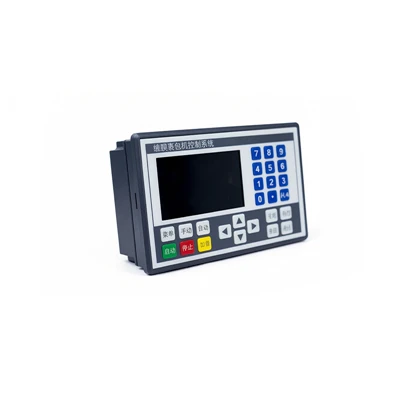
First, let’s get one thing straight: backup isn’t just “copying a file to a USB.” Stretch wrapper control systems aren’t just a single app—they’re a mix of PLC (programmable logic controller) logic, HMI (human-machine interface) screens, recipe settings, and even safety logic that keeps workers from getting hurt. Miss one part, and your restore won’t work when you need it. I’ve had a client once who only backed up their HMI screens and forgot the PLC logic, and when their old controller died, they spent three days trying to rebuild the wrapping sequence from scratch. Not fun.
Let’s start with the basics: what you need to back up, and how to do it step by step. First, identify what controller your system uses—most stretch wrappers these days run on Allen-Bradley, Siemens, or Omron, which are the big three we work with. For each, the backup process is a little different, but the core steps are similar.
For Allen-Bradley (super common in mid-sized warehouses): I always tell clients to use Studio 5000 Logix Designer because that’s the software our systems run on. First, make sure you’re using the same version of Studio 5000 that was originally loaded on the system—if you use a newer version, you might not be able to open the backup later. That’s a mistake I see all the time. To back up, plug a USB drive into the controller’s USB port, open Studio 5000, connect to your system, go to the “Tools” menu, select “Backup Controller,” and pick “Complete Backup” (not just “Program Backup”). Wait for it to finish—don’t yank the USB early, I’ve had corrupt files that way. Then, label that USB with the system’s serial number and the date, and save a copy off-site too. I recommend cloud storage or a separate drive in another building—if your warehouse burns down, a USB on the same shelf as your machines is useless.
For Siemens systems (popular in manufacturing plants): Their software is TIA Portal, right? Same rule applies: use the version that matches what’s on the controller. To back up, connect to the PLC via Ethernet, go to the “Project” tab, select “Backup,” and choose “Backup Controller Data.” Make sure to check the box for “HMI Data” too—Siemens HMIs hold all your recipe settings, like stretch film tension and wrap counts, so leaving that out is a disaster. I had a food processing client who forgot to back up HMI data, and when they swapped a controller, they had to re-input 50+ different product recipes at 2 a.m. The night shift crew was not happy.
Now, what about HMIs? That’s the touchscreen on the wrapper you use to start jobs. A lot of people only back up the PLC and skip the HMI, but if your HMI breaks, you need those screen layouts, alarm settings, and user permissions. For Allen-Bradley HMIs, use FactoryTalk View Studio to back up—same as the PLC software, match the version. For Siemens, use WinCC Flexible (or the newer TIA HMI tool) and back up the project file plus the runtime data. Pro tip: every time you adjust a recipe or tweak a wrap sequence, do a quick backup. I tell our clients to do a full backup once a week, and a mini backup (just the changed files) after every major adjustment. That way, if something breaks, you don’t lose a week’s worth of tweaks.
Now, the restore part. This is where people mess up the most. Don’t just plug the USB and hit “restore” without testing a dry run first. Wait—what’s a dry run? After you do a backup, load it onto a test PLC (we keep spare old controllers for this) and test the restore. That way, if the backup is corrupt, you catch it before you actually need it. Last year, a client came to us panicking because their backup was corrupt, and they thought they’d have to buy a new controller. We got them a test PLC, they loaded the old backup, and it failed—turns out they’d pulled the USB mid-backup, so we did a fresh backup and saved them a $2k controller bill.
When you do need to restore, here’s the step-by-step I walk clients through. First, power off the system completely—do NOT hot swap the controller while it’s running. That’s a surefire way to fry the new controller. If you’re replacing a dead controller, make sure the new one has the same firmware version as the original. If you bought a spare controller from us, we pre-program the firmware so you don’t have to mess with it. Plug the backup USB into the new controller, open your PLC software, connect, go to “Tools,” select “Restore Controller,” and pick the complete backup file. Wait for it to finish—this can take 10-15 minutes, don’t interrupt it. Once it’s done, power cycle the HMI too, because sometimes the HMI needs to re-sync with the new controller. Then, run a test wrap with a scrap load—make sure the stretch tension is right, the wrap count is correct, and all the safety stops work. If that works, you’re good to go. If not, double-check that you restored all parts (PLC + HMI) and that the firmware versions match.
Now, what are the common mistakes to avoid? Let’s list them out, because these are the ones that cause the most headaches. First, not labeling backups. I can’t tell you how many times a client has handed me a USB that says “stretch wrapper backup” and I have to guess which model it is. Label every USB with the machine serial number, backup date, and software version. Second, only backing up to the same physical drive. If your warehouse has a fire, flood, or even a break-in, a USB on the same shelf as your wrapper is gone. We recommend a 3-2-1 backup rule for these systems: 3 copies of the data, 2 on different media, 1 off-site. Third, using mismatched software versions. If you backup with Studio 5000 v30, you can’t restore it to a controller that only runs v28. Updating your PLC software? Always make a new backup right before updating, and test the update on a test machine first. Fourth, forgetting safety logic. A lot of people back up the core wrapping sequence but skip the safety interlocks—like the light curtain that stops the wrapper if someone reaches in. If those aren’t restored, the machine is a hazard, and OSHA will come down on you. That’s not a risk worth taking.
Wait, also—what about older stretch wrappers that use non-networked systems, like a hand-held programmer instead of a Ethernet connection? We have a lot of clients with 10+ year-old wrappers that don’t have USB ports on the controller. For those, you’ll need a serial cable (RS232) to connect your laptop to the controller. The backup process is similar, but you use the software that came with the old system—if you don’t have it, we can send you a copy, no charge, for clients who bought their system from us. And for those old systems, we actually recommend upgrading to a modern PLC with USB/Ethernet ports because backups are way easier, and you won’t have to mess with serial cables. We’ve helped a lot of clients upgrade old wrappers to make backups simpler, and it’s saved them from a lot of downtime.
Another thing: recipe data. That’s super important for packaging lines that run multiple products. If you have 20 different product recipes (each with their own film tension, number of wraps, turntable speed), you don’t want to rebuild those from scratch. When you do your backup, make sure to include the recipe database—for Allen-Bradley, that’s part of the complete backup, for Siemens, it’s in the HMI data. We always tell clients to test their recipes after a restore, because sometimes the recipe numbers might shift a little depending on the system. A quick test with a scrap load will catch that.
Now, let’s talk about when backup saves the day. A few months back, a client in the beverage industry had a PLC die at 7 a.m. on a Monday—their line was down, and they were supposed to ship 5,000 cases of soda by 3 p.m. They had a backup from Friday, so we sent a tech to their site, restored the program, tested it, and they were back up by 9 a.m. Without that backup, they would’ve missed their shipment, lost a client, and paid big overtime to re-program the line. That’s why this stuff matters.
If you’re not already doing regular backups, now’s the time to start. It takes 10 minutes a week, and it can save you hours or even days of downtime when something goes wrong. If you’re not sure how to back up your specific stretch wrapper control system, or if you have questions about restoring, or even if you’re looking to upgrade to a system that makes backups easier, hit up our team here. We specialize in stretch wrapper control systems, so we know every model, every controller, every common issue. We can walk you through a backup step-by-step, even over the phone, or send a tech to your site to make sure your backups are set up right.
Industrial Fan Regulator References:
- Rockwell Automation. (2022). Studio 5000 Logix Designer User Guide: Controller Backup and Restore.
- Siemens AG. (2023). TIA Portal V17 Manual: Backup and Restore for PLC and HMI.
- Occupational Safety and Health Administration (OSHA). (2021). Machine Safety Guidelines for Packaging Equipment: Safety Logic Backup Requirements.
- Omron Corporation. (2022). NJ Series PLC Software Manual: Backup Procedures for Stretch Wrapper Applications.
Wuxi Rstar Electric Co., Ltd.
With abundant experience, we are one of the most professional stretch wrapper control system manufacturers and suppliers in China. Welcome to wholesale bulk customized stretch wrapper control system at competitive price from our factory. If you have any enquiry about quotation, please feel free to email us.
Address: 9th Floor, Building 9, Shengfeng Lianzhi Valley, No.67 Zhujiang Road, Xinwu District, Wuxi City
E-mail: rstarbz@163.com
WebSite: https://www.rstar-wx.com/
