Alright, let’s cut to the chase—if you’re deep in the automation game, you’ve probably heard “offline programming” thrown around with gantry robots, but if you’re like most floor managers I chat with, you might still be thinking, “Wait, that’s just another fancy term for something I already do?” Let’s break this down like we’re grabbing coffee after a long week of machine downtime, no jargon, no sales fluff. First, a quick heads-up: I’m part of the team that builds and supports these gantry robots, so I see the good, bad, and weirdly frustrating stuff you deal with daily. Gantry Robots
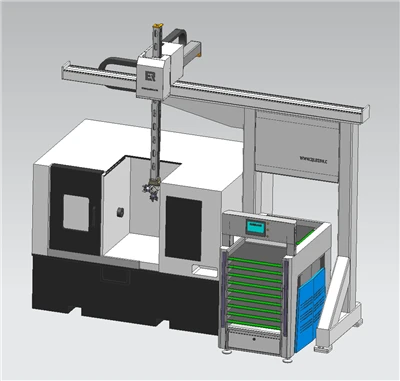
Let’s start with the basics: when you program a gantry robot the old-school way, you’re standing right in front of it, pressing buttons on the teach pendant, moving the arm or gantry rails to pick a part, drop it somewhere, and repeat until the path looks right. For small jobs, that works fine—like programming a pick-and-place for a 5-part assembly that runs once a week. But if you’re cranking out 10k parts a day, switching product lines every other week, or dealing with a gantry that spans 20+ feet across your shop floor? That teach pendant method turns into a nightmare. I’ve seen a team spend 3 days just re-programming a welding gantry because they changed a part bracket, and during that time, their line was down, missing deadlines, and their supervisor was breathing down their neck. Yeah, I’ve been in that room.
Offline programming (OP for short, we’re using that now) is the opposite. Instead of programming the robot while it’s on your floor, idle or working, you do it on a separate computer. Think of it like playing a video game simulation, but way more accurate. You plug in 3D models of your gantry, your workcells, the parts you’re moving, even the conveyors or packaging systems, and then you map out every single movement—pick here, rotate here, place here, avoid that safety fence, don’t crash into that other machine. The computer simulates the whole path, checks for collisions (super important—gantries are big, heavy, and crashing one can cost you $10k in repairs plus downtime), and once it looks perfect, you send the program over to the real robot. No standing there for hours, no risking a bad path that causes damage, no halting production to tweak it.
Wait, but why does this matter for gantry robots specifically? Because gantries aren’t the tiny arm robots you see in labs. Most gantries we build (and most out there) are huge—they cover entire workcells, move heavy parts (like car frames or pallets of widgets), and interact with multiple pieces of equipment at once. A small industrial robot might have 6 axes, but a gantry can have 3 (X/Y/Z rails) plus extra axes for rotating parts, so you’re adding more moving parts that can mess up a path. With teach pendant programming, you have to move the whole gantry rail to test a spot, which means blocking off floor space, shutting down nearby machines, and wasting time. With offline programming, you can tweak a path for a new part in minutes, not days. I had a customer last year that made custom shipping pallets—they switch the pallet size every month for different clients. Before OP, their gantry team spent 2 full days every month re-programming. After switching to our setup with offline programming? They do the whole tweak in 45 minutes, and their line never stops. That’s not a win—that’s life-changing for small manufacturers.
Now, let’s get real about the myths. I hear two big ones all the time: “Offline programming is too expensive” and “It’s only for big companies.” Let’s tackle the first one. Yeah, if you go with a generic, overpriced software add-on, it might sting. But when you pair it with a good gantry robot setup, the ROI (return on investment) is way faster than you think. Let’s do quick math: if your line makes $2,000 an hour when running, and OP cuts programming time from 3 days (72 hours) to 2 hours, that’s $140k in saved production time per program. Plus, no more crash repairs—gantry crashes don’t just break the robot, they can mess up your workcells, floor rails, even nearby equipment. I’ve seen a customer that spent $25k fixing a gantry collision that happened because a teach pendant path was off by an inch. OP eliminates almost all of that risk.
As for “only for big guys”? Nah. We’ve got a 10-person metal stamping shop client that uses our small-to-mid gantries and their own offline programming setup, and they switch parts 8 times a year. They used to shut down for 12 hours every switch; now they do it in 1. That’s extra revenue they didn’t have before because they can take on smaller, custom orders without losing production time. It’s not about company size—it’s about how often you change your product or process. If your line is running the same thing for years, teach pendant works fine. But if you’re even slightly flexible, OP is worth a look.
Wait, but how does it actually work day-to-day for you, the guy on the floor? Let’s walk through a typical scenario. Say you make electric motor housings. Next month, you’re switching to a new, slightly larger housing. Here’s the old way: 1) Shut down the entire production line (2 hours of downtime minimum) 2) Grab the teach pendant, move the gantry’s pick arm to the new housing’s spot on the conveyor 3) Move it to the new place on the assembly jig, check for clearance 4) Repeat for every pick/drop point, test a few parts to make sure no jams, then restart. If you mess up a point, you have to do it all over again, because stopping mid-program usually means errors. With offline programming: 1) Keep the line running as usual (no downtime!) 2) Grab a laptop with the OP software (we load this for our customers, no messy installs) 3) Pull up the 3D model of the new housing (you can get this from your part supplier, or our team helps if you don’t have it) 4) Drag and drop the new housing into your existing simulation 5) Tweak a couple of pick/drop points, the software automatically checks that the gantry doesn’t hit the conveyor, the assembly jig, or even the safety rails around the workcell 6) Hit “send” and the program is on the gantry in 5 minutes, no shutdown needed. Then you do a quick test run with one part, and you’re good to go. That’s not magic—that’s working smarter, not harder.
Another thing most people don’t talk about: error tracking. The OP software logs every movement, every collision check, every tweak. So if you have a problem later—say, a part is getting dented—you can go back and look at the exact path the gantry took, not just guess that you missed a spot on the teach pendant. For our team, that’s a huge win when we’re troubleshooting a client’s issue. We don’t have to guess what they did—we can pull up their simulation, see the path, and give a fix in minutes, not hours.
Now, let’s be real: it’s not all perfect. If your 3D models are wrong (like if you have a slight bend in a metal part that’s not in the CAD file), the simulation might be off. That’s why we tell all our clients to double-check their CADs, and our team offers to help optimize them if they’re not right. Also, you don’t need a coding degree to use it—we train every client’s team in 2-3 hours, max. No weird commands, just dragging and dropping, click a button, done. I’ve had guys that swear they’re “bad with computers” pick it up in an hour and a half.
Wait, and let’s compare this to another thing you might have heard: “offline programming vs. teach pendant, which is better?” It’s not either/or. For initial setups, teach pendant is fine, but for updates, new parts, or troubleshooting, OP is way better. Think of it like this: if you’re building a house, you use a blueprint (simulation/OP) to plan where the walls go, but you need a hammer (teach pendant) to actually put the walls up. Both work, but the blueprint keeps you from making a huge, expensive mistake mid-build.
So who is this for, exactly? If you’re a small shop that runs the same 2-3 parts all year? Stick with teach pendant. If you’re switching parts every month, have gantries that work with multiple workcells, or just hate the stress of shutting down lines to tweak programs? You need to at least talk to someone about offline programming for your gantry.
Now, let’s get to the part that matters most: if this sounds like it could save you time, money, and gray hairs, we’re here to help. We build gantry robots tailored to your shop’s size, and we include the offline programming setup with every new gantry—no hidden fees, no “extra add-on” that costs more than the robot itself. Our team will come out to your floor, show you exactly how OP works with your specific workcells, train your people, and even help you convert old programs so you don’t have to start from scratch. No pressure, no sales pitches, just real talk about making your job easier.
Before I wrap this up, let’s hit a quick recap to make sure we didn’t skip anything: Offline programming for gantry robots is programming your robot on a separate computer via simulation, not on the floor with a teach pendant. It cuts down programming time from days to minutes, eliminates costly crashes, lets you tweak paths without shutting down production, and isn’t just for big companies. It’s the smart way to run a gantry line, no matter your size.

If you’re tired of missing deadlines, dealing with unplanned downtime, or stressing every time you switch a product line, reach out to us. We don’t do generic solutions—we look at your specific parts, your layout, your pain points, and build a gantry + OP setup that works for your shop. No jargon, no overpriced software, just results.
Multi-Layer Pallet Magazine References: 1. Industrial Robot: An International Journal, Vol. 47, No. 3, 2020, pp. 245-252. 2. Robotic Industries Association (RIA) Technical Report: Offline Programming for Material Handling Robots, 2021. 3. Global Gantry Robot Market Analysis, 2023, Automation Industry Association.
Zhejiang Luban Automation Technology Co., Ltd.
As one of the most professional gantry robots manufacturers and suppliers in China, we also support customized service with low price. With abundant experience, we warmly welcome you to wholesale high quality gantry robots for sale here from our factory.
Address: No.19-27-2, Zhonggang Avenue, Huaxi Subdistrict, Changxing County, Huzhou City, Zhejiang Province
E-mail: sales@luban-zdh.com
WebSite: https://www.multilayermagazine.com/
