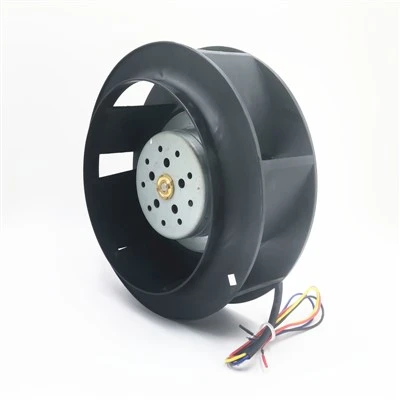
As a supplier of high-speed fans, I understand the frustration that comes with a non – working fan. High – speed fans are crucial in various settings, from industrial environments to home cooling systems. In this blog, I’ll share some effective troubleshooting steps to help you get your high – speed fan up and running again. High Speed Fan
Step 1: Check the Power Source
The first and simplest step in troubleshooting a high – speed fan is to examine the power source. Start by ensuring that the fan is properly plugged into an outlet. Sometimes, the plug may have become loose over time, either due to vibrations or accidental bumps. Give the plug a gentle tug to make sure it is firmly seated in the socket.
Next, verify that the outlet is working. You can do this by plugging in another device, such as a lamp or a charger. If the other device doesn’t work either, the problem may be with the outlet itself. Check the circuit breaker or fuse box in your building. Look for any tripped breakers or blown fuses. If you find a tripped breaker, simply switch it back to the "on" position. For a blown fuse, replace it with a new one of the same amperage rating.
If you’re using an extension cord, make sure it is in good condition. A frayed or damaged cord can disrupt the power supply to the fan. Also, check that the extension cord is rated to handle the power requirements of the high – speed fan. An undersized cord may cause voltage drops and prevent the fan from operating properly.
Step 2: Inspect the Fan’s Control Mechanisms
Many high – speed fans come with a variety of control options, such as speed switches, remote controls, or built – in timers. If the fan isn’t working, start by checking these control mechanisms.
If your fan has a manual speed switch, move it through the different settings. Sometimes, the switch may get stuck in a particular position or develop a fault. Try wiggling the switch gently while the fan is plugged in to see if it starts working. If the switch feels loose or doesn’t click properly, it may need to be replaced.
For fans with remote controls, check the batteries first. Replace the batteries with fresh ones and try operating the fan again. Make sure the remote is pointed directly at the fan’s receiver and that there are no obstructions between them. If the remote still doesn’t work, the receiver on the fan may be malfunctioning. In this case, you may need to consult the fan’s user manual for instructions on resetting the receiver or contact a professional for repair.
If the fan has a built – in timer, it’s possible that it has been set to turn off at a certain time. Check the timer settings and reset them if necessary. Some fans also have safety features that can be triggered, such as an overheat protection switch. If the fan has been running for an extended period in a hot environment, the overheat switch may have tripped. Let the fan cool down for a while and then try starting it again.
Step 3: Examine the Fan Blades
The fan blades play a crucial role in the operation of a high – speed fan. Over time, they can accumulate dust, dirt, or debris, which can affect their balance and performance.
Start by unplugging the fan for safety. Then, visually inspect the fan blades. Look for any signs of damage, such as cracks, chips, or bent blades. A damaged blade can cause the fan to vibrate excessively or not spin at all. If you find a damaged blade, it’s best to replace it. You can usually order replacement blades from the fan manufacturer or a reliable parts supplier.
Even if the blades are not damaged, they may be dirty. Use a soft brush or a can of compressed air to clean the blades. Gently brush away any dust or debris, being careful not to bend the blades in the process. For stubborn dirt, you can use a mild detergent and a soft cloth to wipe the blades clean. Make sure the blades are completely dry before plugging the fan back in and testing it.
Step 4: Check the Motor
The motor is the heart of the high – speed fan, and if it’s not working properly, the fan won’t spin. However, diagnosing motor problems can be a bit more complex.
First, listen for any unusual noises coming from the motor when you try to turn on the fan. A grinding, squealing, or humming sound can indicate a problem. A grinding noise may suggest that there is a problem with the bearings in the motor. Bearings can wear out over time, especially if the fan has been used frequently. If you suspect bearing problems, it’s usually best to have the motor serviced by a professional.
A humming sound without the fan spinning could mean that the motor is getting power but is unable to start. This could be due to a faulty capacitor. The capacitor helps the motor start and run smoothly. If the capacitor is damaged or has failed, the motor may not be able to overcome the initial inertia to start spinning. Replacing a capacitor requires some electrical knowledge, so it’s advisable to have it done by a qualified technician.
If the motor smells burnt, it’s a serious sign of trouble. A burnt smell can indicate that the motor has overheated or that there is a short circuit. In this case, immediately unplug the fan to prevent further damage and contact a professional for repair or replacement.
Step 5: Look for Wiring Issues
Wiring problems can also cause a high – speed fan to stop working. Inspect the wiring inside the fan carefully. Start by unplugging the fan and removing the outer casing if possible. This will give you access to the internal wiring.
Look for any signs of frayed, damaged, or loose wires. A frayed wire can cause a short circuit, which will prevent the fan from operating. If you find a frayed or damaged wire, you can try to repair it by cutting out the damaged section and splicing in a new piece of wire. However, this requires some electrical skills. If you’re not confident in your abilities, it’s best to have a professional handle the wiring repair.
Check the connections between the wires and the motor, switch, and other components. Make sure that all the connections are tight. A loose connection can disrupt the electrical flow and cause the fan to malfunction. If you find a loose connection, carefully tighten it using a screwdriver or the appropriate tool.
After completing all these troubleshooting steps, it’s time to test the fan again. Plug it in and turn it on. If the fan still doesn’t work, it may be time to consider replacing it. However, if you’ve managed to get the fan working, it’s a good idea to perform some regular maintenance to prevent future problems.
Regular cleaning of the fan, checking the power source, and inspecting the control mechanisms can go a long way in ensuring the reliable operation of your high – speed fan.
AC Axial Fan As a high – speed fan supplier, I’m committed to providing you with the best products and support. If you’re in the market for a new high – speed fan, or if you have any questions about troubleshooting or maintenance, don’t hesitate to reach out. I can offer you a wide range of high – quality fans that are suitable for different applications, whether it’s for industrial cooling, home ventilation, or office use. Contact me to start a discussion about your specific requirements and let’s find the perfect fan solution for you.
References
- "Home Appliance Repair Handbook" by Robert Johnson
- Manufacturer’s user manuals for high – speed fans
- Electrical engineering textbooks on motor and wiring systems
Dongguan Shengzhirong Electronics Co., Ltd.
As one of the most professional high speed fan manufacturers and suppliers in China, our products have good reputation in the market. Please rest assured to wholesale high quality high speed fan made in China here from our factory. Customized orders are welcome.
Address: 6/F, Building 2, No.68, Shunxing 2nd Road, Dajingtou 2nd Industrial Zone, Dalang Town, Dongguan City, Guangdong, China
E-mail: szr_coolingfan@163.com
WebSite: https://www.szrfan.com/
